
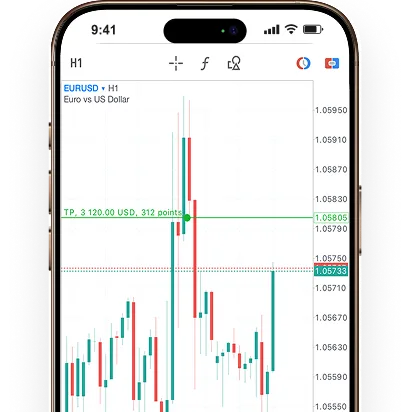
Benefits
Trade globally with Wisuno MT5.

Powerful Quantitative Trading & EA
Wisuno supports quantitative trading and expert advisors (EAs), enabling advanced strategies and automation for greater efficiency, accuracy, and market opportunities.

6 Pending Order Types
Self-set pending orders: stop loss buy orders, stop loss sell orders, limit price buy orders, limit price sell orders, take profit, stop loss.

One Click Trading
Wisuno One-Click Trading lets users execute trades instantly, simplifying the process for faster, easier access to market opportunities.

Micro Hand Trading
Wisuno enables trading with micro-lots, allowing beginners and experienced traders to manage risk, fine-tune strategies, and maintain greater control over investments.
FAQS
Frequently asked questions.
How do I download MetaTrader 5 mobile app for Android and iPhone?
Download the MT5 mobile app free from Google Play Store (Android) or Apple App Store (iPhone/iOS) by searching "MetaTrader 5". Install the app and log in using your Wisuno account credentials. The Wisuno MT5 mobile platform provides access to forex, stocks, commodities, and indices with institutional-grade execution.
What is the difference between MT5 and MT4 mobile apps?
MT5 mobile offers more advanced features than MT4, including additional timeframes (21 vs 9), more technical indicators (38 vs 30), an economic calendar, depth of market (DOM), and support for stocks and futures beyond forex. While both support EAs and one-click trading, MT5 provides enhanced analytical tools and multi-asset trading capabilities.
Does MT5 mobile support automated trading and Expert Advisors?
Yes, Wisuno MT5 mobile fully supports Expert Advisors (EAs) for automated algorithmic trading. You can run, monitor, and manage trading robots directly from your smartphone. The platform's powerful quantitative trading capabilities enable sophisticated strategies with greater efficiency and accuracy across multiple markets.
Can I use one-click trading on MT5 mobile app?
Wisuno MT5 mobile includes one-click trading functionality that enables instant market order execution with a single tap. This eliminates confirmation dialogs and reduces execution time, making it perfect for traders who need to capitalize on rapid market movements and price opportunities instantly.
How many pending order types does MT5 mobile offer?
MT5 mobile provides 6 pending order types: Buy Stop, Sell Stop, Buy Limit, Sell Limit, plus Take Profit and Stop Loss levels. These conditional orders execute automatically when your target price is reached, allowing for advanced trading strategies and comprehensive risk management without constant monitoring.
What is micro-lot trading on MT5 mobile and who should use it?
Micro-lot trading on Wisuno MT5 mobile allows positions as small as 0.01 lots (1,000 units). This feature benefits beginners managing risk with smaller capital, experienced traders testing strategies with real money, and anyone requiring precise position sizing. It provides flexibility and control for traders at all experience levels.
Is the MT5 mobile app safe and secure for trading?
Wisuno MT5 mobile employs bank-level 128-bit SSL encryption, secure authentication, and biometric login options (fingerprint/Face ID). All data transmission between your device and trading servers is encrypted, meeting international financial security standards. You can trade confidently knowing your account and data are protected.
Can I trade stocks and forex on the same MT5 mobile app?
Yes, Wisuno MT5 mobile supports multi-asset trading including forex, stocks, commodities, indices, and futures all from one platform. Unlike MT4 which focuses primarily on forex, MT5's advanced architecture allows seamless switching between different asset classes, making it ideal for diversified trading portfolios.
Get Wisuno MT5.
Enhance your trading experience with the world’s most popular platform and Wisuno’s industry leading execution.


